# A tibble: 4 × 2
   line text
  <int> <chr>
1     1 Because I could not stop for Death -
2     2 He kindly stopped for me -
3     3 The Carriage held but just Ourselves -
4 4 and Immortality Tidy Text & Tokenization
Code along 03
Dr. D
2026-09-14
Learning objective
By the end of today, you’ll be able to:
- Convert raw text into tidy text format
- Apply tokenization to break text into words
- Remove stop words
- Extend a stop word list with a custom dictionary
Deja vu?
You already did this — Week 1, Day 1:
Today we slow down and understand why this works.
Why this matters for your data
- Amy’s interviews and survey responses are just… text
- Before you can code themes, search for keywords, or analyze sentiment — you need a structure to work with
- “Tidy text” is that structure
1.1 — Tidy text vs. other formats
Recap: what makes data “tidy”?
From Weeks 1–2:
- Each variable is a column
- Each observation is a row
- Each value is a cell
Tidy text: one token (usually a word) per row
Four ways to store text
| Format | What it looks like |
|---|---|
| String | Raw character vectors |
| Corpus | Raw strings + metadata |
| Document-term matrix (DTM) | One row per document, one column per term, sparse matrix |
| Tidy text | One row per token |
We’ll come back to corpus objects and DTMs later. For now we’re looking at tidy text.
1.2 — The unnest_tokens() function
Our example text
Tokenizing
What just happened?
- Split each line into individual words
- Stripped punctuation
- Converted everything to lowercase
- Preserved the
linecolumn — we still know where each word came from
🎯 Your turn
Try it yourself
Tokenize text_df — split it into one word per row.
Stop words
- Common words that carry little meaning: the, and, of, to…
tidytextships a built-instop_wordsdata frame- Remove them with an anti-join
Removing stop words
# A tibble: 7 × 2
line word
<int> <chr>
1 1 stop
2 1 death
3 2 kindly
4 2 stopped
5 3 carriage
6 3 held
7 4 immortality🎯 Your turn
Try it yourself
Add a step to your pipe that removes stop words.
Custom dictionaries
stop_wordsis just a data frame — you can edit it- Add domain-specific “noise” words (e.g. filler words specific to interview transcripts: um, like, okay)
Same anti_join(), just a richer stop word list.
🎯 Customize your dictionary
- Look at the output of
text_df |> unnest_tokens(word, text)and pick a word. - Add this word to your custom dictionary by adding this word in quotations to the
word = c("um", "uh", "like", "okay")vector. - Rerun the code to create
custom_stopwordsand thenall_stopwords - Rerun the code to
anti_jointhe word tokens to the newall_stopwordsdictionary.
Solution
# A tibble: 6 × 2
   line word
  <int> <chr>
1     1 death
2     2 kindly
3     2 stopped
4     3 carriage
5     3 held
6     4 immortality
1.3 — Tidying the works of Jane Austen
Meet janeaustenr
# A tibble: 6 × 2
  text                    book
  <chr>                   <fct>
1 "SENSE AND SENSIBILITY" Sense & Sensibility
2 ""                      Sense & Sensibility
3 "by Jane Austen"        Sense & Sensibility
4 ""                      Sense & Sensibility
5 "(1811)"                Sense & Sensibility
6 ""                      Sense & Sensibility
View this data set to get a better idea of it’s structure
Adding structure
Let’s add a line number for each book, add a variable to identify the chapters.
# A tibble: 6 × 4
  text                    book                linenumber chapter
  <chr>                   <fct>                    <int>   <int>
1 "SENSE AND SENSIBILITY" Sense & Sensibility          1       0
2 ""                      Sense & Sensibility          2       0
3 "by Jane Austen"        Sense & Sensibility          3       0
4 ""                      Sense & Sensibility          4       0
5 "(1811)"                Sense & Sensibility          5       0
6 ""                      Sense & Sensibility          6       0
Tokenize at scale
Metadata variables like chapter number are still retained.
# A tibble: 725,055 × 4
   book                linenumber chapter word
   <fct>                    <int>   <int> <chr>
 1 Sense & Sensibility          1       0 sense
 2 Sense & Sensibility          1       0 and
 3 Sense & Sensibility          1       0 sensibility
 4 Sense & Sensibility          3       0 by
 5 Sense & Sensibility          3       0 jane
 6 Sense & Sensibility          3       0 austen
 7 Sense & Sensibility          5       0 1811
 8 Sense & Sensibility         10       1 chapter
 9 Sense & Sensibility         10       1 1
10 Sense & Sensibility         13       1 the
# ℹ 725,045 more rows
🎯 Your turn
Try it yourself
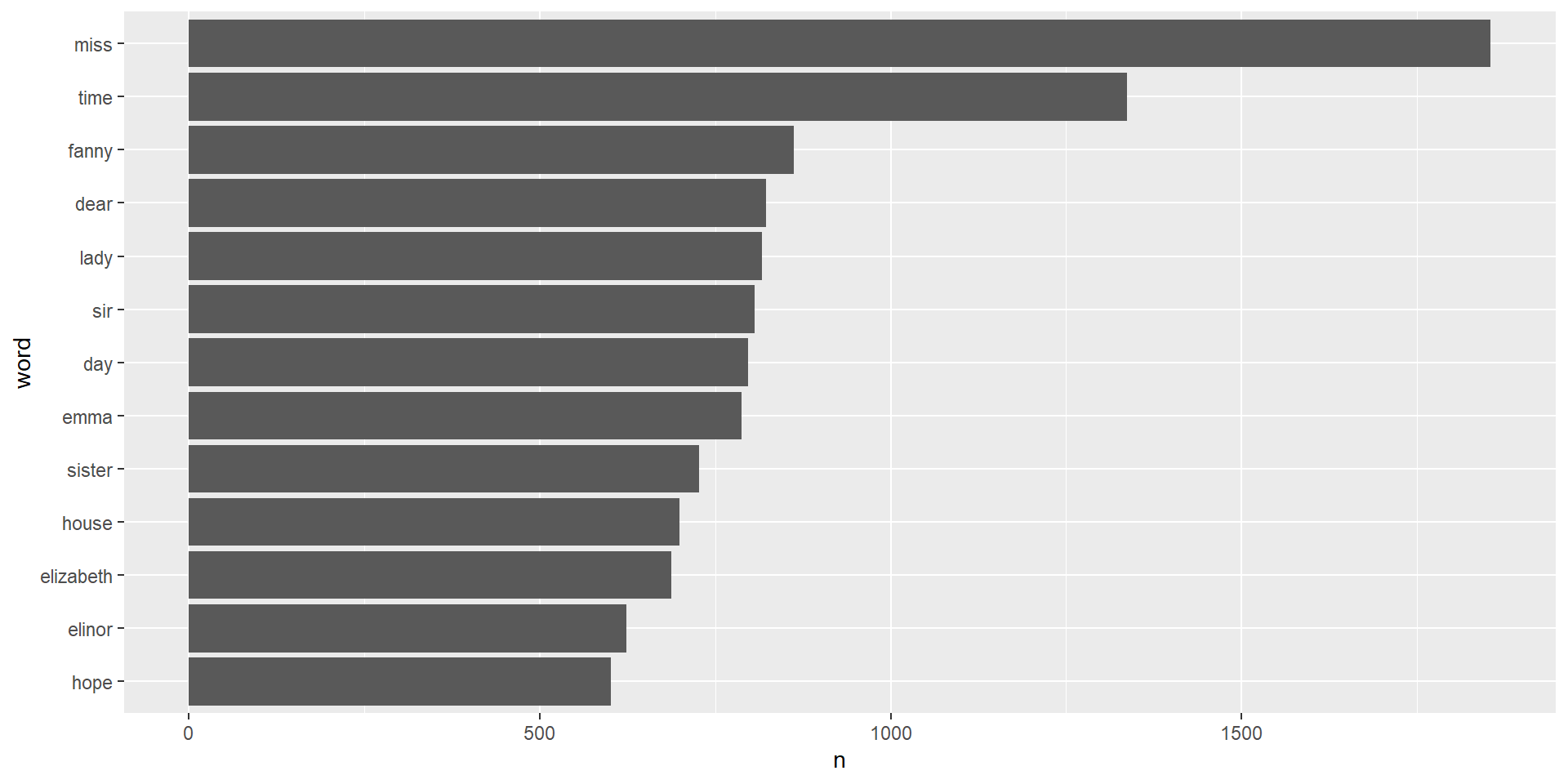
Remove stop words from tidy_books using anti_join, then count and sort word frequencies. What are the most frequent words used?
Payoff
We can save the results in a new data set that we can then analyze.
Visualize it
- 1
-
take the
tidy_booksdata set and then - 2
- count the number of times each word appears
- 3
- only keep words with more than 600 occurances
- 4
-
sort the variable
wordby how often it shows up (n) - 5
- make a horizontal barplot by putting the word on the y axis and the frequency on the x axis.
Visualize it
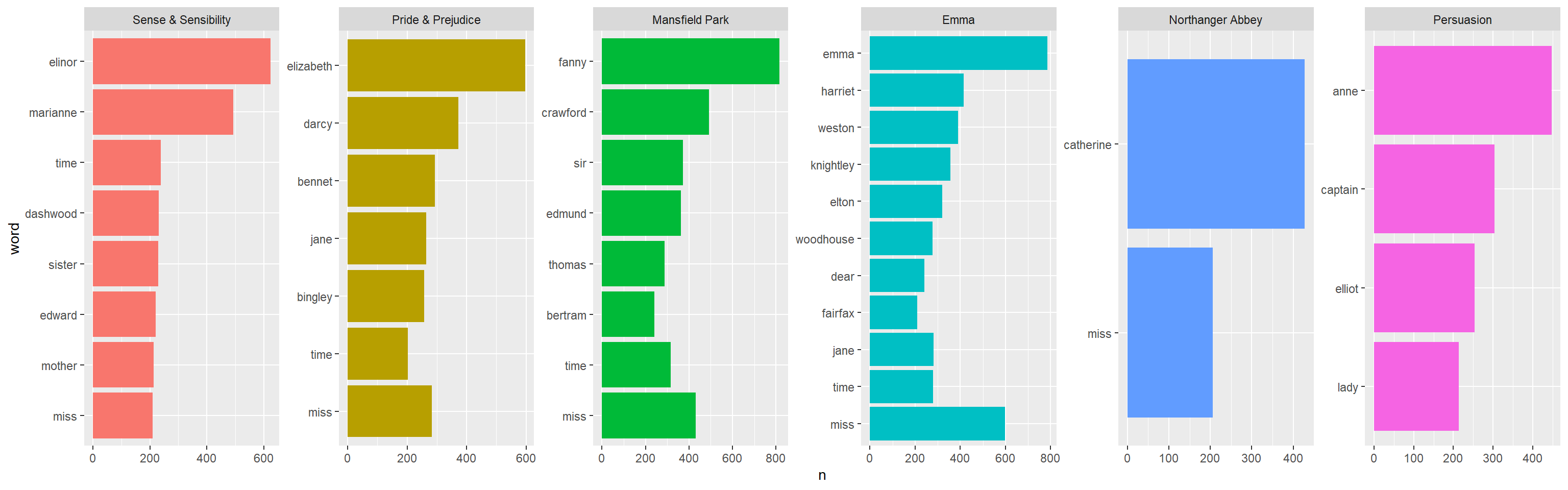
Ask further questions
Is there a difference in the most frequent words across books?
Wrap-up
Recap
- Tidy text = one token per row
- Core pattern:
unnest_tokens()+anti_join(stop_words) - Custom dictionaries extend stop words for your domain
- Word frequency comparisons reveal patterns between documents or speakers
Next week
Chapter 2 — Sentiment analysis
We’ll take this same tidy structure and start asking: is this word positive or negative?
Qualitative Methods (MATH 698/POLS 671 Fall 26) - https:://wickedproblems.netlify.app